How the app actually works — logging, screens, backup and limits. HEKE stays on the device; we cannot recover a journey we never hosted. For anything else, email sfactortechnologies@gmail.com.
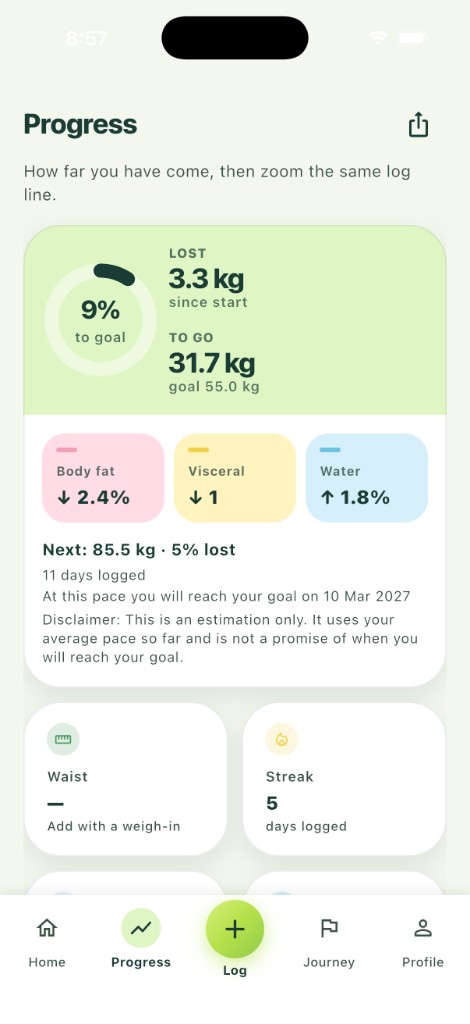
HEKE Progress showing percent to goal, weight lost, remaining, body-composition change, next milestone and streak
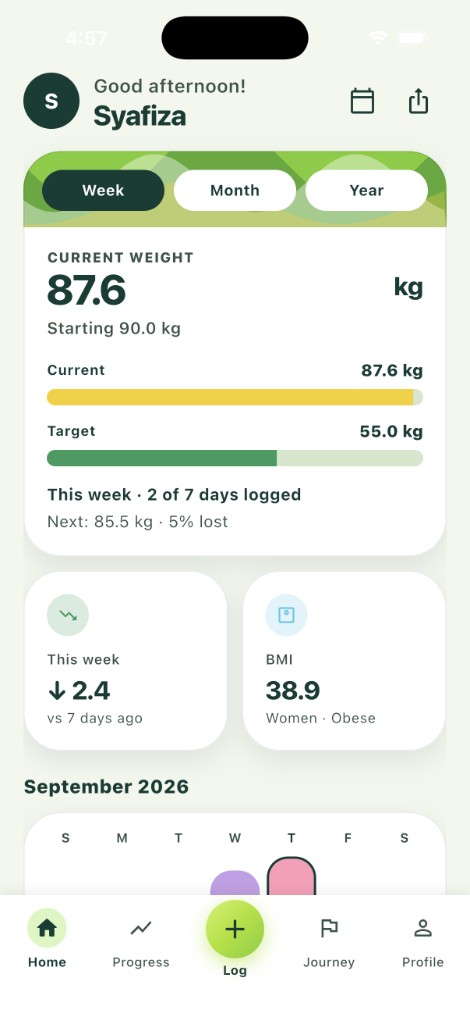
HEKE home showing weekly progress, the next milestone, BMI and the week calendar
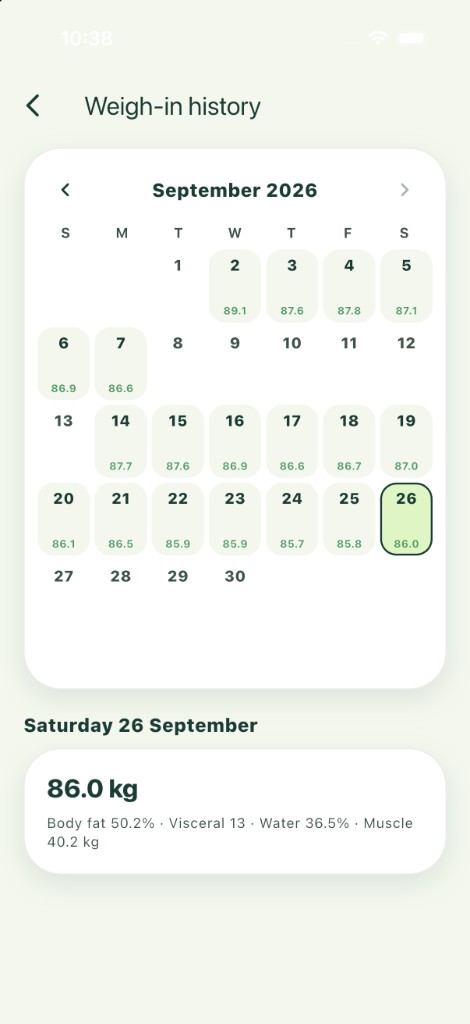
HEKE weigh-in history as a month calendar, with the selected day’s weight and body composition
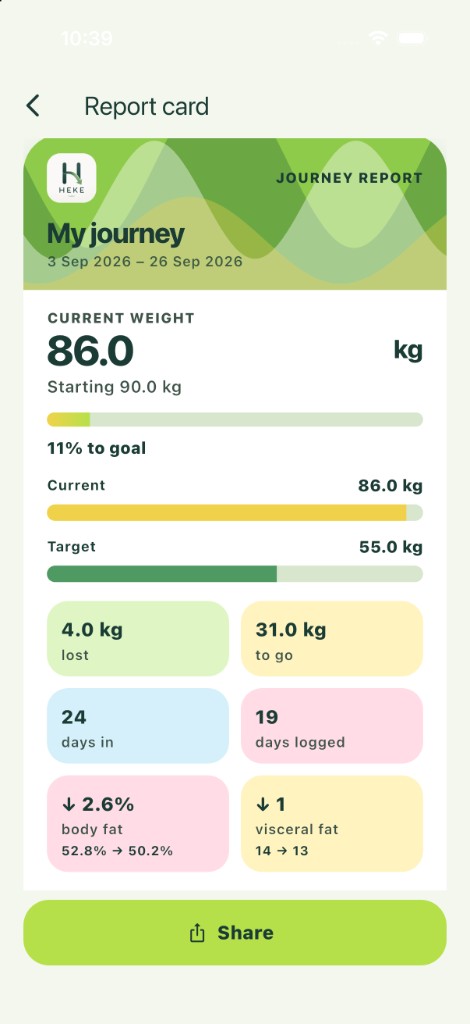
HEKE monthly Journey Report with weigh-ins logged that month, lost and remaining, and body-fat and visceral-fat change
Swipe to preview HEKE
Getting started
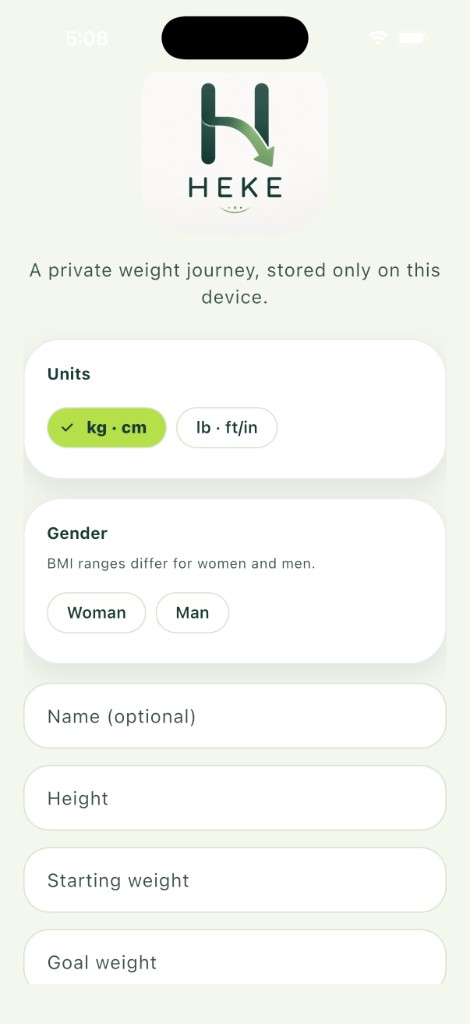
On first launch, choose units (kilograms and centimetres, or pounds and feet/inches). You can change units later in Profile.
Add height, starting weight, goal weight and a start date. Choose woman or man so it can appear on your profile — it is not used to calculate BMI.
A display name is optional and stays on this device. It can appear on a Journey Report later if you turn that option on. There is no HEKE account and no sign-in.
HEKE setup with units, gender, optional name, height, starting weight and goal weight
Logging a weigh-in
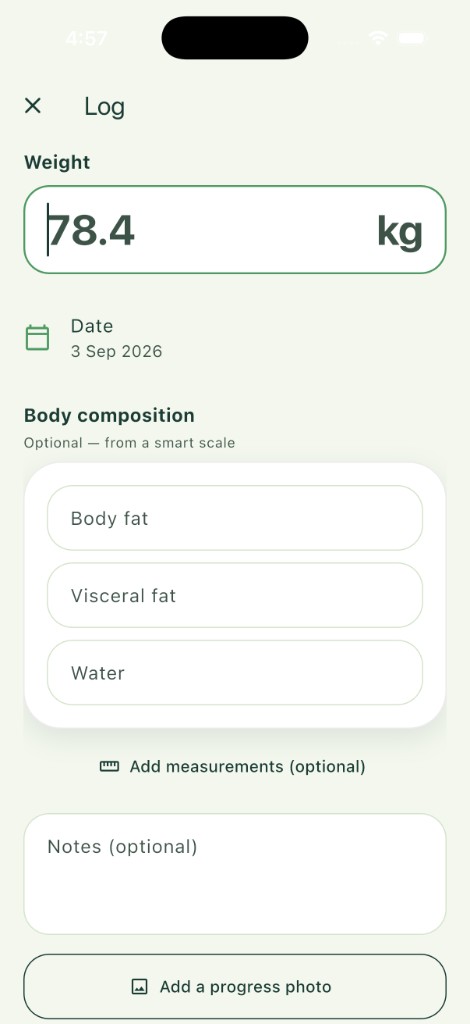
Open Log. Weight and date are required. You can log a past date if you are catching up.
Body fat, visceral fat and water are optional percentages you type in. Muscle mass is optional and uses kilograms or pounds — the same unit as your weight. HEKE does not connect to a smart scale, Apple Health or Health Connect in the current version.
Tape measurements (waist, hips, chest, thigh, arm), a note and a progress photo are also optional.
HEKE log screen for a weigh-in, optional body composition, measurements, notes and a photo
History
History is a month calendar of your weigh-ins. Move between earlier months. You cannot open a month after the current one. A logged day shows that day’s weight. If you logged more than once, the day also shows how many extra entries there are.
Tap a day to see that date. Open a weigh-in to edit it, or swipe to delete it. An empty day that is today or earlier offers Log weight for that date. A future day stays empty.
HEKE weigh-in history as a month calendar, with the selected day’s weight and body composition
Home
Home is a snapshot for the period you pick — week, month or year. It shows current weight beside the goal, days logged, the next percentage-lost milestone, weekly change and BMI.
Weekly change is the difference from about seven days earlier when there is a weigh-in to compare. BMI needs height from your profile and uses adult WHO categories also published by the CDC and NHS. Open BMI sources in Profile for the formula and ranges. A calendar marks days you have logged.
If Home looks empty, finish onboarding and save at least one weigh-in.
HEKE home showing weekly progress, the next milestone, BMI and the week calendar
Progress
Progress shows how far you have come: percent of the way to the goal, weight lost or gained since start, remaining to the goal, and optional body-composition change when you have logged those figures more than once. Body fat, visceral fat and water are percentages. Muscle mass change is in kilograms or pounds.
After about a week on the journey, Progress may estimate a goal date from your average pace so far. That date is an estimate only — not a promise of when you will reach your goal. Pace can change. Waist, streak, lightest or heaviest weight, and progress photos stay on this screen too.
Share from the header to make a Journey Report on this device. Nothing is uploaded.
HEKE Progress showing percent to goal, weight lost, remaining, body-composition change, next milestone and streak
Trends
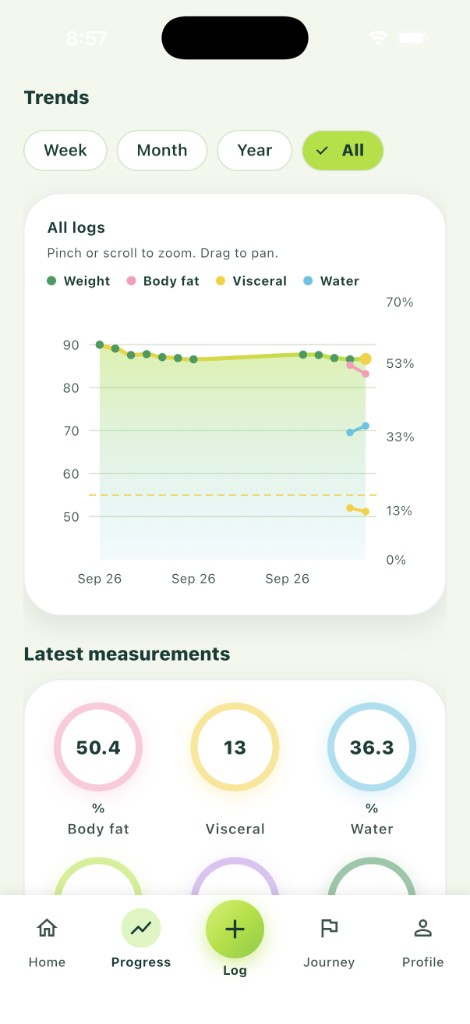
Trends sits on the Progress tab. It charts the same log: weight plus optional body fat, visceral fat, water and muscle mass. Muscle mass is drawn in kilograms or pounds, on the same scale as your weight. Filter by week, month, year or all. Pinch or scroll to zoom; drag to pan. A goal line sits on the chart when a goal is set.
Latest measurements from your most recent weigh-in appear under the chart. If a period looks empty, widen the filter or log more dates — the chart only plots what you entered.
HEKE Trends chart with weight, body fat, visceral fat and water, plus latest measurements
Journey
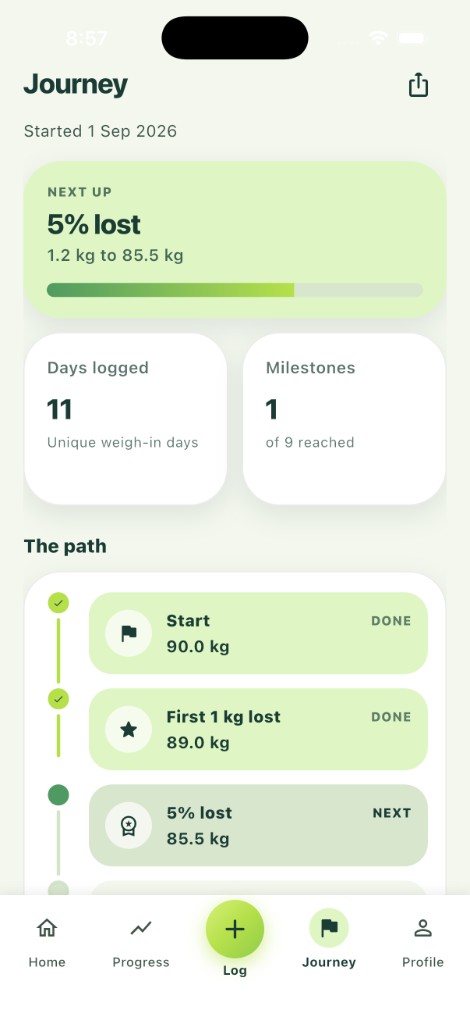
Journey shows the next milestone and how much is left, then a path from your start through first 1 kg and percentage-lost milestones (for example 5%, 10% and 15%) towards the goal you set. It also shows unique days logged and how many of those milestones you have already reached.
The path stays on screen even on a quiet week. Percentages and remaining kilograms are calculated on the device from start, current weight and goal — they are planning numbers, not a diagnosis. Share from the header for the same on-device Journey Report as Progress.
HEKE Journey showing the next milestone, days logged and a path from start through first 1 kg lost
Sharing a report
A Journey Report is a monthly image made on this device. Each month starts on the 1st, using the weight already on record at the end of the previous month. You can move between months before you share. The card shows how many weigh-ins you logged that month, along with current weight, start, goal, lost and remaining. When body fat or visceral fat is logged on at least two different days, that change appears on the card too. Open share from Progress or Journey. Use Include my name if you want the optional display name on the card; leave it off to share more privately.
Share uses the system share sheet (Messages, Photos, Files or another app). Nothing is uploaded to HEKE. Once the image leaves the app, you choose who receives it and how they store it.
HEKE monthly Journey Report with weigh-ins logged that month, lost and remaining, and body-fat and visceral-fat change
Profile, units and reminders
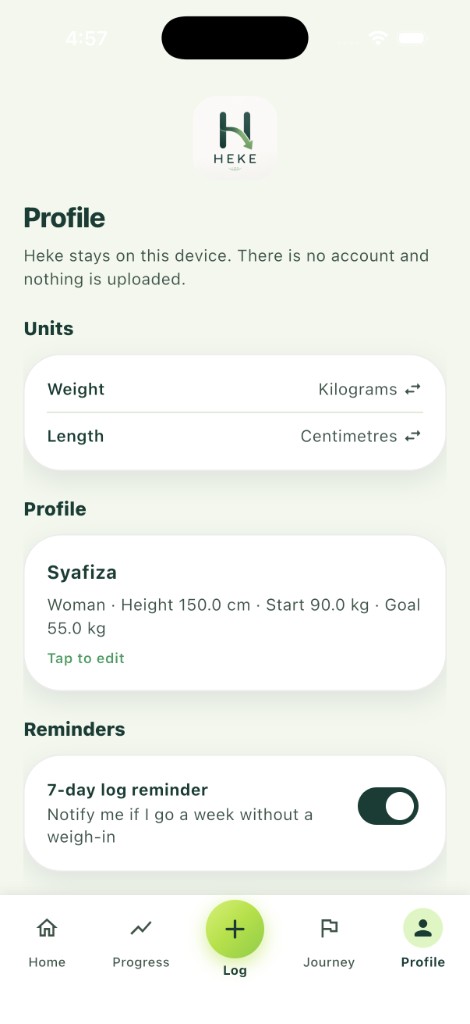
Profile is where you edit name, gender, height, start and goal, and switch units. Clear all data removes the journey on this device. Export a backup first if you still need a copy — this cannot be undone from our side.
The optional log reminder is a local notification on the phone or tablet if you have not logged for about a week. It is not a push from a HEKE server. Turn it off in Profile. Reminders are not available in a web build.
If the reminder never appears, check notification permission in system settings. HEKE only reads the device time zone to schedule that local reminder.
Legal & support in Profile opens Terms of Use, Privacy Policy and Support in the device browser on sfactortechnologies.com. That visit is not a HEKE account. BMI sources in Profile shows the WHO adult categories (also published by the CDC and NHS) and can open those publishers’ pages if you choose.
HEKE Profile with units, on-device details and a 7-day log reminder
Backup and restore
Export a JSON backup for a full copy (profile, weigh-ins, notes and photos encoded in the file). Export CSV for a spreadsheet of dates, weights, measurements and notes — CSV does not include photos.
Restore from a JSON file you pick. Restore replaces everything currently in HEKE on that device, including photos. If you restore the wrong file, we cannot roll it back; keep a second copy if you need one.
The app uses the device’s file-save and file-pick sheets. You choose where the file goes. Uninstalling without a backup removes local data with the app. Because we do not host your journey, we cannot restore data we never received.
Photos and permissions
A progress photo is copied into HEKE’s local database. It is not uploaded to us. The operating system may ask for Photos, media or camera access; names differ on Apple and Android.
You can refuse or later revoke access in system settings. Without the permission a feature needs, attaching or saving a photo will not work. Only store photos you have the right to use, and do not store photos or health information about children or other people without permission.
What HEKE does not do
HEKE does not count calories or meals, offer coaching, fasting timers or a social feed. It does not sync with Apple Health or Health Connect in the current version.
There is no account, store subscription or in-app purchase in this version, so there is nothing to restore through the App Store or Google Play.
BMI, weekly change, milestone figures and any estimated goal date are estimates from the numbers you enter. They are not medical, nutritional or fitness advice. HEKE is not a medical device.
Troubleshooting
Chart or Home empty for a period: confirm weigh-ins exist in that date range, then change the week / month / year / all filter.
BMI missing: add height in Profile, then log a weight. Weekly change missing: log (or keep) a weigh-in from about a week earlier. Goal date missing: log for about a week with a pace that is moving toward the goal; the date is an estimate only.
Reminder silent: allow notifications, confirm the reminder is on in Profile, and use the iOS or Android app — not a web build. After a reboot, the system may restart the local reminder on its own.
Lost data after uninstall, a new phone, or Clear all data: we have no cloud copy. Restore only works from a JSON backup you still have. If you attach a backup to a support email, we then receive that file — send it only if you intend to.
Contact support
Write to sfactortechnologies@gmail.com or use the contact form. Include the device, app version and a short description of what happened. Do not attach a JSON backup unless you want us to receive that copy of your journey.